Overview
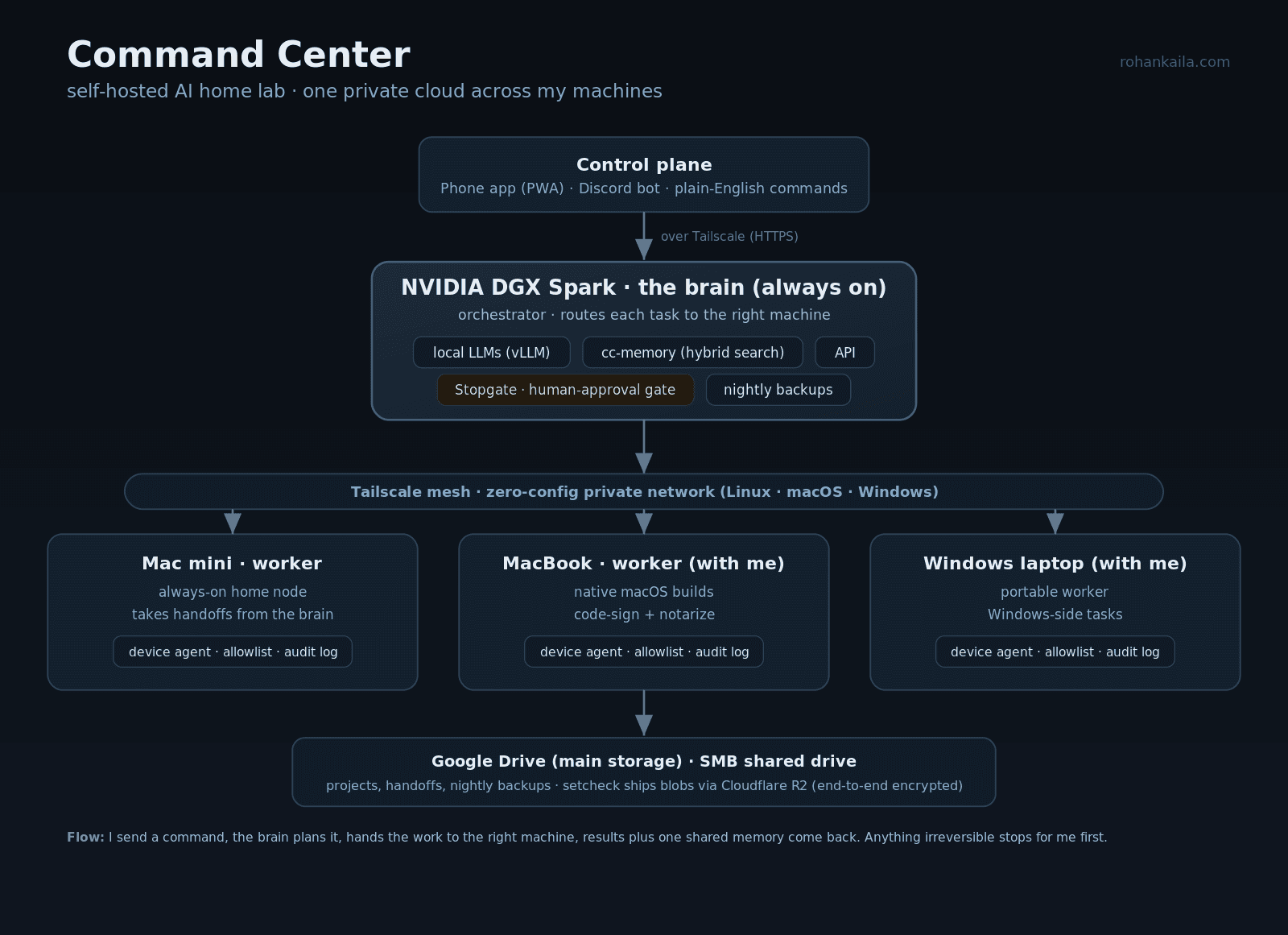
Command Center is my personal AI infrastructure. Three machines, a NVIDIA DGX Spark I treat as the brain, a Mac mini, and an old Windows laptop, are meshed into one private network with Tailscale and act like a single computer. The DGX stays on and runs the orchestration; the other two are workers. I talk to the whole thing in plain English from a phone app or Discord and it decides which machine does the job.
The Problem
I wanted my own infrastructure to build and run AI projects without renting a cloud for every experiment, and I wanted to control all of my machines from one place instead of SSHing into each one. I also wanted the system to remember context across every project and every chat, so I never had to re-explain my setup.
My Approach
One always-on box as the brain, the rest as workers, all on a zero-config private network. A shared memory service every machine and every chat reads and writes, so context is never lost. And a hard rule that any autonomous action which spends money, deletes data, or touches production stops and asks me first. Autonomy where it is safe, a gate where it is not.
Technical Implementation
Local LLM serving with vLLM on the DGX. A memory service built on SQLite with FTS5 full-text plus sqlite-vec vector search, fronted by an HTTP API with a single writer so it never corrupts. An orchestrator that routes each request to the right machine and streams results back. A small agent on every machine that only runs an allowlist of file operations, writes an append-only audit log, and pauses for my approval on anything risky. A phone-installable app and a Discord bot as the control plane, served over the private network with real HTTPS. Nightly encrypted backups. It spans Linux, macOS, and Windows, each with its own always-on setup.
Results
I run real projects on it: this website, an AI-safety research package, a music production tool, and an encrypted file-sharing app. From my phone, away from home, I can tell it to build something and it dispatches the work to the right machine and reports back. Every machine and every conversation shares one memory, so the system always knows my setup.
What I Learned
Most of what makes AI infrastructure real is the boring reliability work: services that restart themselves, power settings so laptops do not sleep, authentication, and backups. And that guardrails are what make autonomy safe to leave running. A system that can act on four machines needs a human gate on the actions you cannot undo.